
Keel Framework / Keel/MCP / Java
Developer Scaffolding
This section describes how Keel materializes its reference architecture in an MCP Server generated through scaffolding, providing a standardized initial structure on which teams can develop their functional capabilities.
The scaffolding combines the architectural structure, the reusable technical modules and the development conventions defined by Keel, providing a common base for building new MCP Servers.
Architectural Scaffolding
From Keel-Framework/MCP we propose a base scaffolding for MCP Servers that integrates the starters and fundamental modules that make up the Keel architecture.
This scaffolding provides a standardized, preconfigured initial structure, letting development teams focus from the start on implementing the domain logic, while guaranteeing integration with the common technical and cross-cutting capabilities provided by Keel.
The scaffolding generates a standardized structure of modules and packages, organized by responsibility, providing the architectural base on which the MCP Server will be implemented.
Each module encapsulates a specific technical or functional scope, favoring separation of responsibilities, low coupling and the independent evolution of components.
| Module / Folder | Type | Responsibility | Content |
|---|---|---|---|
_boot |
Maven module | Server startup and configuration | Executable module containing Application.java, bootstrap.yml, application*.yml and the configuration needed to start the application. It can be packaged as a deployable WAR through ServletInitializer or run locally as a Spring Boot application. |
_mcp |
Maven module | Implementation of the MCP capabilities | Contains the components related to the MCP Server, including Tools, Resources and Prompts, as well as the functional logic exposed through the MCP protocol and the components needed to integrate with the framework. |
_model |
Maven module | Domain model | Contains models, DTOs, entities and mappers based on MapStruct, as well as the data structures and contracts used by the different project modules. |
Example of a project generated by the scaffolding:
The following example shows the structure of an MCP Server generated with the Keel Maven Archetype.
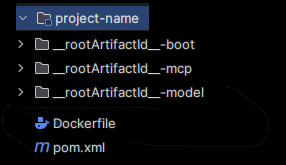
Module Naming
The standard modules defined in the Keel Maven Archetype use base identifiers (_boot, _mcp and _model) that are automatically renamed during project generation, incorporating the project name while keeping the standard literal defined by the architecture.
For example, for a project named:
- Project name:
sales-mcp-framework
The generated modules will be:
sales-mcp-bootsales-mcp-mcpsales-mcp-model
This keeps a homogeneous, standardized naming for all projects generated from the Keel Maven Archetype.
Physical Project Structure
The Keel Maven Archetype generates a base MCP Server structure ready to start developing the project's functional capabilities.
The generated structure is organized through a clear separation of responsibilities, distinguishing the components related to application startup, the implementation of the MCP capabilities, the domain modeland the CI/CD process configuration.
This organization provides a common base for the MCP Servers generated with Keel, easing the standardization of the project structure, >low coupling between modules and the independent evolution of their components.
On top of this base structure, the development team can add the domain-specific logic and extend the MCP capabilities through Tools, Resources and Prompts, keeping the functional responsibilities separate from the technical capabilities provided by Keel.
The following structure shows the main modules, packages and files generated by the Archetype
Base scaffolding of the package structure:
<name-project-mcp>/
├── Dockerfile
├── pom.xml
│
├── _boot/
│   ├── pom.xml
│   └── src/
│       └── main/
│           ├── java/
│           │   └── Application.java
│           │
│           └── resources/
│               ├── application.yml
│               ├── application-dev.yml
│               ├── application-pre.yml
│               ├── application-pro.yml
│               ├── bootstrap.yml
│               └──user-truststore.jks
│
├── _mcp/
│   ├── pom.xml
│   ├── prompts/
│   │   └── Prompts.java
│   ├── resources/
│   │   └── Resources.java
│   └── tools/
│       └── Tools.java
│
├── _model/
│   ├── pom.xml
│   ├── dto/
│   │   └── HelloWorldItemDTO.java
│   ├── entity/
│   │   └── HelloWorldItemEntity.java
│   ├── errors/
│   │   └── ExemploErrorsMsg.java
│   └── mapper/
│       └── HelloWorldItemMapper.java
│
└── pom.json
Configuration of the MCP Server
The configuration of the MCP Server generated by Keel is centralized mainly in the application.yml file, located in the _boot module under src/main/resources.
This file contains the main application configuration and lets you define the parameters needed for the server to start and run in the different execution environments.
This section is divided into 8 technical configuration aspects that describe the purpose of each block of the MCP Server generated by Keel, providing the context needed to understand what each property controls before modifying it.
(1-8) Application Identity
The spring block configuration defines the identity and base behavior of the Spring Boot application.
spring:
  application:
    name: keel-mcp-sample
  threads:
    virtual:
      enabled: true
  main:
    web-application-type: servlet
| Property | Description |
|---|---|
spring.application.name |
Logical name of the application, used in logs, metrics and traces. |
spring.threads.virtual.enabled |
Enables Virtual Threads (Java 21+). Each request and each Tool invocation runs on a lightweight virtual thread, which improves scalability under I/O-intensive workloads (REST calls to backends) without needing large platform thread pools. |
spring.main.web-application-type |
servlet forces the Servlet stack (Tomcat / WebMVC), consistent with the synchronous Streamable HTTP transport. |
(2-8) Protocol Transport
The spring.ai.mcp.server block configures the behavior of the MCP server and defines the server type, the transport protocol and the mechanisms used to register the MCP capabilities.
spring:
  ai:
    mcp:
      server:
        type: SYNC
        protocol: STREAMABLE
        stdio:
          enabled: false
        streamable-http:
          mcp-endpoint: /mcp
          keep-alive-interval: 30s
        annotation-scanner:
          enabled: true
| Property | Description |
|---|---|
type: SYNC |
The MCP server operates in synchronous mode (McpSyncServer), not reactive. |
protocol: STREAMABLE |
Uses the Streamable HTTP transport, the one recommended by the MCP specification for remote servers. |
stdio.enabled: false |
Disables the console transport: this server runs as an independent HTTP service, not as a local subprocess of a client. |
streamable-http.mcp-endpoint |
Path on which the MCP protocol is exposed. |
streamable-http.keep-alive-interval |
A ping is sent every 30 s to keep the connection with the client alive. |
annotation-scanner.enabled |
Enables automatic scanning of beans annotated with @McpTool, @McpResource, @McpPrompt and @McpComplete. |
(3-8) TLS Communication
The server block defines the HTTP port used by the application and the server's TLS configuration.
server:
  port: 8080
  ssl:
    enabled: false
| Property | Description |
|---|---|
server.port: 8080 |
HTTP port the application listens on. |
server.ssl.enabled: false |
Disables TLS directly in Tomcat. In the deployment environment, TLS can be terminated at an earlier layer such as an Ingress, Load Balancer or API Gateway. |
(4-8) Adapters
The keel.adapters configuration provides reusable capabilities for external communication and authentication cache management. The rest-client adapter organizes SSL, backend service, and HTTP client configuration, while the cache adapter provides cache management.
keel:
  adapters:
    rest-client:
      ssl:
        enabled: true
        trust-store: ${TRUSTSTORE_LOCAL}
        trust-store-password: ${TRUSTSTORE_PASSWORD}
        trust-store-type: ${TRUSTSTORE_TYPE}

      services: {}
      # Example backend service:
      # services:
      #   name-service:
      #     base-url: https://api.example.sca.es
      #     log-requests: true

      http-client:
        socket-timeout: 60000
        connect-timeout: 60000
        request-timeout: 60000
        max-total-connections: 200
        max-connections-per-route: 20
        connection-time-to-live: 300000
        keep-alive: 10000

    cache:
      expire-after-write: 30m
      expire-after-access: 30m
      maximum-size: 500
      record-stats: true
keel.adapters.rest-client.ssl:
The TLS configuration shared by all outgoing calls; services.<name> registers each backend that Tools can invoke through McpRestClientFactory. Each service is identified by its key (product) and resolved by name from the code.
| Property | Description |
|---|---|
ssl.enabled: true |
Enables SSL/TLS for outgoing calls made by the REST client adapter, so it uses the custom trust store configured below. |
ssl.trust-store |
Path to the trust store containing the certificates (for example, the CA or the target server's certificate) that the client trusts when opening HTTPS connections. Taken from the TRUSTSTORE_LOCAL environment variable. |
ssl.trust-store-password |
Password used to open the trust store. Taken from the TRUSTSTORE_PASSWORD environment variable, so it is not stored in the configuration file. |
ssl.trust-store-type |
Format of the trust store file, such as JKS or PKCS12. Taken from the TRUSTSTORE_TYPE environment variable. |
keel.adapters.rest-client.services:
Registry of backend services that Tools can invoke through McpRestClientFactory. Each entry is identified by its key (e.g. name-service) and resolved by name from the code. By default the map is empty ({}); uncomment and add entries as needed.
| Property | Description |
|---|---|
services: {} |
Empty map by default. Each key registers a named backend service available to the MCP tools at runtime. |
services.<name>.base-url |
Root URL of the backend service (e.g. https://keel.api.example.es). All requests made through this service are resolved relative to this URL. |
services.<name>.log-requests |
When set to true, logs every outgoing HTTP request and response for this service. Useful for debugging; should be disabled in production to avoid leaking sensitive data. |
keel.adapters.rest-client.http-client:
Global HTTP client settings applied to every outgoing call made through McpRestClientFactory. These defaults govern timeouts, connection pooling and keep-alive behaviour for all registered services unless a specific service overrides them.
| Property | Description |
|---|---|
socket-timeout: 60000 |
Maximum time (in milliseconds) to wait for data on an already-established connection. If no bytes arrive within 60 s the request is aborted. |
connect-timeout: 60000 |
Maximum time (in milliseconds) to establish a TCP connection with the remote host. The attempt fails after 60 s. |
request-timeout: 60000 |
Maximum time (in milliseconds) to obtain a connection from the pool. Prevents requests from queuing indefinitely when the pool is exhausted. |
max-total-connections: 200 |
Upper limit of simultaneous connections the pool can hold across all backend services. |
max-connections-per-route: 20 |
Maximum number of simultaneous connections allowed to a single host/route. Prevents one busy backend from consuming the entire pool. |
connection-time-to-live: 300000 |
Maximum lifespan (in milliseconds) of a pooled connection, regardless of activity. After 5 minutes the connection is discarded and a new one is created, helping avoid stale connections behind load balancers. |
keep-alive: 10000 |
Default keep-alive duration (in milliseconds) used when the server response does not include a Keep-Alive header. Idle connections are kept open for 10 s before being eligible for eviction. |
keel.adapters.cache:
Configuration of the Caffeine in-memory cache used by the Keel framework. These settings control expiration policies, maximum capacity and statistics recording for all cached entries managed by the adapter.
| Property | Description |
|---|---|
expire-after-write: 30m |
Time after which a cached entry expires, measured from the moment it was written (or last replaced). After 30 minutes the entry is evicted regardless of how often it is read. |
expire-after-access: 30m |
Time after which a cached entry expires, measured from its last read or write access. The 30-minute window resets every time the entry is accessed, keeping frequently used data alive longer. |
maximum-size: 500 |
Maximum number of entries the cache can hold. When this limit is reached, the least-recently-used entries are evicted to make room for new ones. |
record-stats: true |
Enables hit/miss/eviction statistics collection. Useful for monitoring cache effectiveness through metrics endpoints; can be disabled in production if the overhead is not desired. |
(5-8) Transport JWT Authentication
The keel.mcp.transport.auth block configures the authentication of requests addressed to the MCP Server.
keel:
  mcp:
    transport:
      auth:
        enabled: true
        jwt:
          issuer: ${JWT_ISSUER:https://sso.example.com/realms/mcp}
          audience: ${JWT_AUDIENCE:mcp-server}
          jwks-ttl: 1h
        excluded-paths:
          - /actuator/health
          - /actuator/info
| Property | Description |
|---|---|
auth.enabled |
The MCP endpoint requires a valid JWT in the Authorization: Bearer header. |
jwt.issuer |
OIDC identity provider (Keycloak / Red Hat SSO) that issues the tokens. The public keys are obtained from the issuer's JWKS endpoint. |
jwt.audience |
Expected audience in the aud claim. It must be defined: an unvalidated audience allows tokens issued for other applications to be reused. |
jwt.jwks-ttl |
Time the public keys are cached before being refreshed. |
excluded-paths |
Paths exempt from authentication, needed so that Kubernetes / OpenShift probes work without a token. |
Audience validation must be configured according to the security policies of the environment. Incomplete validation of the JWT claims can reduce the security level of authentication.
(6-8) Transport Session Management
keel.mcp.transport.session:
Controls the session lifecycle for the Streamable HTTP transport. Each client that connects through the /mcp endpoint creates an independent session; these properties limit how many can be active simultaneously and how long they are kept alive before being discarded.
keel:
  mcp:
    transport:
      session:
        max-sessions: 500
        session-timeout: 30m
        log-events: false
| Property | Description |
|---|---|
max-sessions: 500 |
Maximum number of concurrent MCP sessions allowed on the Streamable HTTP transport. Once this limit is reached, new connection attempts are rejected until an existing session expires or is closed. |
session-timeout: 30m |
Time of inactivity after which an idle session is automatically closed and its resources released. The 30-minute window resets with each client interaction. |
log-events: false |
When set to true, logs session lifecycle events (creation, expiration, closure). Disabled by default to reduce log noise in production. |
(7-8) Observability
The observability block controls the generation of structured logs associated with the different event types of the MCP Server. Structured JSON logs, enabled per level through environment variables:
keel:
  mcp:
    observability:
      enabled: ${MCP_OBSERVABILITY_ENABLED:true}
      technical: ${MCP_OBSERVABILITY_TECHNICAL:true}
      functional: ${MCP_OBSERVABILITY_FUNCTIONAL:true}
      security: ${MCP_OBSERVABILITY_SECURITY:true}
| Level | What it records |
|---|---|
technical |
HTTP requests and responses to the backends. |
functional |
MCP Tool invocations: name, arguments, result and duration. |
security |
JWT authentication and session management events. |
(8-8) Actuator and logging
The management block configures the Spring Boot Actuator endpoints, while the logging block sets the application's logging levels.
management:
  endpoints:
    web:
      exposure:
        include: health, info, metrics
  endpoint:
    health:
      show-details: when-authorized

logging:
  level:
    root: INFO
    io.github.keelframework.mcp: INFO
| Property | Description |
|---|---|
management.endpoints.web.exposure.include |
Defines the Actuator endpoints exposed over HTTP. In this case: health, info and metrics. |
management.endpoint.health.show-details |
Configures the level of detail shown by the health check endpoint. |
logging.level.root |
Defines the global logging level of the application. |
logging.level.com.framework.observability.logging |
Defines the specific logging level for the Keel observability components. |
It exposes /actuator/health, /actuator/info and /actuator/metrics. show-details: when-authorized shows the detail of the health indicators only to authenticated users; use always only in local environments, since the detail can reveal hosts and states of internal dependencies.
Developing MCP Tools
This section describes the implementation model for MCP Tools in Keel, taking the Keel archetype as the base reference architecture for generating MCP Server projects based on Spring AI.
Tools are developed in the <project>-mcp module of the generated project, inside the <base-package>.mcp.tools package (for example, io.github.keelframework.mcp.sample.tools).
@Tool — Implementation
A Tool represents a business capability exposed by the MCP Server so that it can be invoked by an agent or an LLM. Although its implementation is relatively simple, all Tools must follow a set of conventions that guarantee a homogeneous, maintainable architecture that is consistent across projects.
Keel provides a base structure that standardizes the implementation of Tools, including code organization, communication with backend systems, error handling, observability and the registration of the capabilities available to the model.
Implementing a Tool involves 7 technical aspects, described in the following sections:
| # | Aspect | Key element | Mandatory |
|---|---|---|---|
| 1 | Method definition | tools package, Spring bean (@Component), typed signature |
✅ |
| 2 | @Tool annotation on the method |
description with the format: WHAT IT DOES / WHEN TO USE IT / WHAT IT RETURNS |
✅ |
| 3 | @ToolParam annotation on the parameters |
description (type + valid values + example), required |
✅ |
| 4 | Error handling | try/catch; throw McpToolException, which Keel converts into a structured MCP error |
✅ |
| 5 | Observability | Trace with mcplog.logTool(service, path, httpStatus, duration) on success and on error |
✅ |
| 6 | Tool registration | Explicit ToolCallbackProvider bean: MethodToolCallbackProvider.builder().toolObjects(bean).build() |
✅ |
| 7 | Naming convention | Verb + noun, camelCase (e.g. getProduct) |
✅ |
Standard structure of a Tool (Spring AI stack)
Every Tool developed on Keel must follow a common structure that makes it easy to understand both for developers and for the LLM. This structure includes the method definition, the functional description through the @Tool and @ToolParam annotations, the invocation of backend services, the recording of observability traces and uniform error handling.
The following example shows the recommended structure:
package io.keelframework.sample.mcp.tools;
import io.keelframework.mcp.adapters.rest.client.McpRestClient;
import io.keelframework.mcp.adapters.rest.client.McpRestClientFactory;
import io.keelframework.mcp.adapters.rest.exception.RestClientException;
import io.keelframework.mcp.adapters.rest.model.RestResponse;
import io.keelframework.mcp.common.exceptions.McpToolException;
import io.keelframework.sample.model.dto.PetstoreDTO;
import io.keelframework.sample.model.errors.PetstoreErrorsMsg;
import jakarta.annotation.PostConstruct;
import org.springframework.ai.tool.annotation.Tool;
import org.springframework.ai.tool.annotation.ToolParam;
import org.springframework.stereotype.Component;
import io.keelframework.mcp.observability.logging.handler.McpAuthLoggingHandler;
import org.slf4j.Logger;
import org.slf4j.LoggerFactory;
import java.util.List;
import java.util.Map;

@Component
public class PetstoreTools {

    private static final Logger log = LoggerFactory.getLogger(PetstoreTools.class);

    private static final String SERVICE_NAME = "petstore";
    private static final List VALID_STATUSES = List.of("available", "pending", "sold");

    private McpRestClient petClient;
    private final McpRestClientFactory restClientFactory;
    private final McpAuthLoggingHandler mcplog;

    public PetstoreTools(McpRestClientFactory restClientFactory, McpAuthLoggingHandler mcplog) {
        this.restClientFactory = restClientFactory;
        this.mcplog = mcplog;
    }

    @PostConstruct
    void init(){
        this.petClient = restClientFactory.getClient(SERVICE_NAME);
    }

    @Tool(description = """
        Find a pet by its identifier.
        Use when the user asks about a specific pet or mentions an ID.
        Returns the pet's name, category and status.
        """)
    public PetstoreDTO.PetResponse findPet(
            @ToolParam(description = "Numeric ID of the pet. Example: 1, 2, 3")
            long petId) {

        long start = System.nanoTime();
        String path = "/pet/" + petId;
        try {
            RestResponse response = petClient.get(
                    "/pet/{petId}", PetstoreDTO.PetResponse.class, petId);

            long durationMs = (System.nanoTime() - start) / 1_000_000;
            mcplog.logTool(SERVICE_NAME, path, response.httpStatus(), durationMs);
            return response.body();
        }
        catch (RestClientException e) {
            long durationMs = (System.nanoTime() - start) / 1_000_000;
            mcplog.logTool(SERVICE_NAME, path, 500, durationMs);
            log.warn(PetstoreErrorsMsg.PET_NOT_FOUND_MSG, petId, path, e.getMessage());
            throw new McpToolException(SERVICE_NAME, path, 500,
                    "Could not retrieve pet " + petId, e);
        }
    }

    @Tool(description = """
        List pets filtered by status.
        Use when the user wants to see available, pending or sold pets.
        Returns the list with name, category, status and the total number of results.
        """)
    public PetstoreDTO.PetListResponse listPets(
            @ToolParam(description = "Status to filter by. Valid values: available, pending, sold.")
            String status) {

        if (!VALID_STATUSES.contains(status)) {
            log.warn(PetstoreErrorsMsg.PET_INVALID_STATUS_MSG, status);
            throw new McpToolException(SERVICE_NAME, "/pet/findByStatus", 400,
                    "Invalid status '" + status + "'. Valid values: available, pending, sold.");
        }

        long start = System.nanoTime();
        String path = "/pet/findByStatus";
        try {
            RestResponse> response =  petClient.getListWithQueryParams(
                    path, Map.of("status", status), PetstoreDTO.PetResponse[].class);

            long durationMs = (System.nanoTime() - start) / 1_000_000;
            mcplog.logTool(SERVICE_NAME, path, response.httpStatus(), durationMs);

            List pets = response.body();
            return new PetstoreDTO.PetListResponse(pets, pets.size());
        }
        catch (RestClientException e) {
            long durationMs = (System.nanoTime() - start) / 1_000_000;
            mcplog.logTool(SERVICE_NAME, path, 500, durationMs);
            log.warn(PetstoreErrorsMsg.PET_LIST_FAILED_MSG, status, path, e.getMessage());
            throw new McpToolException(SERVICE_NAME, path, 500,
                    "Could not retrieve the pet list for status '" + status + "'", e);
        }
    }
Getting the RestClient in the Tool
Once the backend is registered in application.yml (see REST adapter: backend services), the adapter-rest-client module automatically creates an McpRestClient associated with that <service-name>.
Keel does not inject the client directly: it injects a factory, McpRestClientFactory, through the constructor, which provides the client for each backend from the same logical name used in the configuration. This lets the client be resolved at runtime, and lets the same Tool talk to several backends without changing its constructor.
private final McpRestClientFactory restClientFactory;

    private static final String SERVICE_NAME = "petstore";
    private McpRestClient petClient;

    public PetstoreTools(McpRestClientFactory restClientFactory, McpAuthLoggingHandler mcplog) {
        this.restClientFactory = restClientFactory;
    }

    @PostConstruct
    void init(){
        this.petClient = restClientFactory.getClient(SERVICE_NAME);
    }
If the Tool uses a single backend, resolve it once in @PostConstruct as in the example; if it needs several, call getClient(...) in each method.
Step by step: components to inject:
| Component | Role |
|---|---|
McpRestClientFactory |
Factory that provides an already configured McpRestClient (base-url, TLS, timeouts) for a given service, through getClient("<service-name>"). |
McpRestClient |
HTTP client associated with a specific backend. It exposes get, post, put, delete, etc., and returns a model.io.keelframework.mcp.adapters.rest.RestResponse<T> with the typed body and the HTTP status code. |
1. Get the backend client
Inside the Tool (or once in @PostConstruct), resolve the client with the service name registered in application.yml:
this.petClient = restClientFactory.getClient(SERVICE_NAME)
The "product" string must exactly match the key defined in keel.mcp.adapters.rest.services.<service-name>. If it does not match, the factory throws an IllegalArgumentException at startup.
2. Invoke the endpoint
Use client.get(...) (or the corresponding HTTP verb) with the relative path, the expected response class and the path or query parameters. The base-url, TLS and timeouts are already resolved from the adapter configuration:
RestResponse response = petClient.get("/pet/{petId}", PetstoreDTO.PetResponse.class, petId);
return response.body();
Developing MCP Prompts
This section describes the implementation model for MCP Prompts in Keel, taking the Keel archetype as the base reference architecture for generating MCP Server projects based on Spring AI.
Prompts are developed in the <project>-mcp module of the generated project, inside the <base-package>.mcp.prompt package (for example, io.github.keelframework.mcp.sample.prompts).
@Prompt — Implementation
A Prompt represents a conversation template exposed by the MCP Server to guide the LLM through specific functional flows of the business domain covered by the server.
Unlike a Tool, which exposes an executable business capability, a Prompt does not execute logic by itself: it structures and conditions the reasoning of the LLM, telling it which Tools to invoke, in which order, with which validations and in which response format.
Although its implementation is relatively simple, all Prompts must follow a set of conventions that guarantee a homogeneous, maintainable architecture that is consistent across projects.
Keel provides a base structure that standardizes the implementation of Prompts, including code organization, the definition of input arguments, the construction of the template messages and the control of multi-tool flows.
Technical aspects of implementing a Prompt
Implementing a Prompt involves six technical aspects:
| # | Aspect | Key element | Mandatory |
|---|---|---|---|
| 1 | Method definition | prompts package, Spring bean (@Component), method returning McpSchema.GetPromptResult |
✅ |
| 2 | @McpPrompt annotation on the method |
name (format: <context>-<action>, kebab-case) + description with the format: WHICH FLOW IT GUIDES / WHEN TO USE IT |
✅ |
| 3 | @McpArg annotation on the parameters |
description (type + format/valid values + example), required |
✅ |
| 4 | Message construction | List<McpSchema.PromptMessage> with explicit instructions: Tools to invoke, order, dependencies between steps, output format and handling of empty results |
✅ |
| 5 | Message role | USER (the LLM decides freely) vs USER + ASSISTANT (forced response format / few-shot) |
✅ |
| 6 | Method naming convention | Verb + noun, camelCase (e.g. findProduct) |
✅ |
Prompts annotated with
@McpPromptare automatically registered on the server thanks tospring.ai.mcp.server.annotation-scanner.enabled: true; unlike Tools, they do not require an explicit registration bean.
Standard structure of a Prompt
Every Prompt developed on Keel must follow a common structure that makes it easy to understand both for developers and for the LLM. This structure includes the method definition, the functional description through the @McpPrompt and @McpArg annotations, the construction of the message template (McpSchema.GetPromptResult) that guides the LLM in invoking the required Tools, and the explicit definition of the expected response format.
The following example shows the recommended structure:
package io.keelframework.sample.mcp.prompts;
@Component
public class PetstorePrompts {

    @McpPrompt(
            name = "petstore-find-pet",
            description = "Template for looking up a pet by its ID. " +
                    "Use when the user wants full details about one specific pet."
    )
    public McpSchema.GetPromptResult findPetPrompt(
            @McpArg(description = "Numeric ID of the pet. Example: 1, 2, 3")
            String petId) {
        return new McpSchema.GetPromptResult(
                "Look up a pet by ID",
                List.of(
                        new McpSchema.PromptMessage(
                                McpSchema.Role.USER,
                                new McpSchema.TextContent(
                                        "Give me the full details of the pet with ID " + petId + ".\n" +
                                                "Include its name, category and current status."))
                ));
    }

    @McpPrompt(
            name = "petstore-register-pet",
            description = "Template for registering a new pet, guiding the model to " +
                    "collect name, category and status before calling the registerPet tool. " +
                    "Use when the user wants to add a pet but hasn't given all the required fields yet."
    )
    public McpSchema.GetPromptResult registerPetPrompt() {

        return new McpSchema.GetPromptResult(
                "Register a new pet, step by step",
                List.of(
                        new McpSchema.PromptMessage(
                                McpSchema.Role.USER,
                                new McpSchema.TextContent(
                                        "I want to register a new pet.")),
                        new McpSchema.PromptMessage(
                                McpSchema.Role.ASSISTANT,
                                new McpSchema.TextContent(
                                        "Sure! I need three things before I can register the pet:\n" +
                                                "1. Name\n" +
                                                "2. Category (e.g. Dog, Cat, Bird)\n" +
                                                "3. Status (available, pending, or sold)\n\n" +
                                                "Please provide all three, and I'll confirm the details " +
                                                "back to you before registering."))
                ));
    }
}
Developing MCP Resources
This section describes the implementation model for MCP Resources in Keel, taking the Keel archetype as the base reference architecture for generating MCP Server projects based on Spring AI.
Resources are developed in the <project>-mcp module of the generated project, inside the <base-package>.mcp.resources package (for example, io.github.keelframework.mcp.sample.resources).
@Resources — Implementation
A Resource represents a source of information exposed by the MCP Server to give the LLM the context and business rules it needs before reasoning or invoking a Tool.
Unlike a Tool, which exposes an executable business capability, a Resource does not execute business logic nor produce side effects: it only delivers read-only content (static or dynamic) that the LLM can consult to inform itself.
Although its implementation is relatively simple, all Resources must follow a set of conventions that guarantee a homogeneous, maintainable architecture that is consistent across projects.
Keel provides a base structure that standardizes the implementation of Resources, including code organization, the definition of the URI, the construction of the returned content and the criteria for deciding whether the content should be static or dynamic.
Technical aspects of implementing a Resource
Implementing a Resource involves five technical aspects:
| # | Aspect | Key element | Mandatory |
|---|---|---|---|
| 1 | Method definition | resources package, Spring bean (@Component), method returning McpSchema.ReadResourceResult |
✅ |
| 2 | @McpResource annotation on the method |
uri (format: <scheme>://<context>/<resource>), name (kebab-case: <context>-<resource>), mimeType and description with the format: WHAT IT CONTAINS / WHEN TO CONSULT IT |
✅ |
| 3 | Content construction | List<McpSchema.TextResourceContents> inside the ReadResourceResult, with the same uri and mimeType declared in the annotation |
✅ |
| 4 | Content origin | Static (constant in code, does not change) vs dynamic (fetched from the backend in real time through McpRestClient, always read-only) |
✅ |
| 5 | Method naming convention | Verb + noun, camelCase (e.g. getProductRules) |
✅ |
Resources annotated with
@McpResourceare automatically registered throughspring.ai.mcp.server.annotation-scanner.enabled: true, just like Prompts.
Standard structure of a Resource
Every Resource developed on Keel must follow a common structure that makes it easy to understand both for developers and for the LLM. This structure includes the method definition, the functional description through the @McpResource annotation, the construction of the response content (McpSchema.ReadResourceResult) that exposes the information to the LLM, and the explicit definition of the content origin (static or dynamic) and its format.
The following example shows the recommended structure:
package io.keelframework.sample.mcp.resources;
@Component
public class PetstoreResources {

    @McpResource(
            uri = "petstore://tools-guide",
            name = "Petstore tools guide",
            description = "Describes when and how to use each available Petstore tool. " +
                    "Consult when the LLM needs to decide which tool to call.",
            mimeType = "text/plain"
    )
    public String toolsGuide() {
        return """
                AVAILABLE TOOLS IN petstore-sample:

                1. findPet(petId)
                   - When to use:  the user asks about a specific pet or gives an ID
                   - Parameters:   petId (long) — numeric identifier of the pet
                   - Example:      "What's the status of pet 5?"
                   - Returns:      id, name, category and status of the pet

                2. listPets(status)
                   - When to use:  the user wants to browse pets by availability
                   - Parameters:   status (String) — one of: available, pending, sold
                   - Example:      "Show me all available pets"
                   - Returns:      a list of pets matching that status, plus the total count

                3. registerPet(name, category, status)
                   - When to use:  the user wants to add a new pet to the store
                   - Parameters:   name (String), category (String), status (String, one of:
                                   available, pending, sold)
                   - Example:      "Register a new dog named Rex, available"
                   - Returns:      the newly registered pet, including its assigned ID

                GENERAL RULES:
                - Never invent pet data — always use the tools for real information
                - If a required parameter is missing, ask the user before calling the tool
                - "status" only accepts: available, pending, sold — reject anything else
                  and ask the user to pick one of these three values
                """;
    }

}
This Resource is of static origin: its content is defined in code and does not change between invocations. For a dynamic Resource (for example, the catalog of current lines of business), the method would fetch the content from the backend through McpRestClient on every read, keeping the same response structure.